
Valex Executor
The most reliable Roblox executor for 2026. Valex Executor runs entirely outside the game client — no traces, no crashes, no detection. Works on Windows, macOS, Android, and iOS with a single click. Over 4,000 scripts ready in the built-in hub.
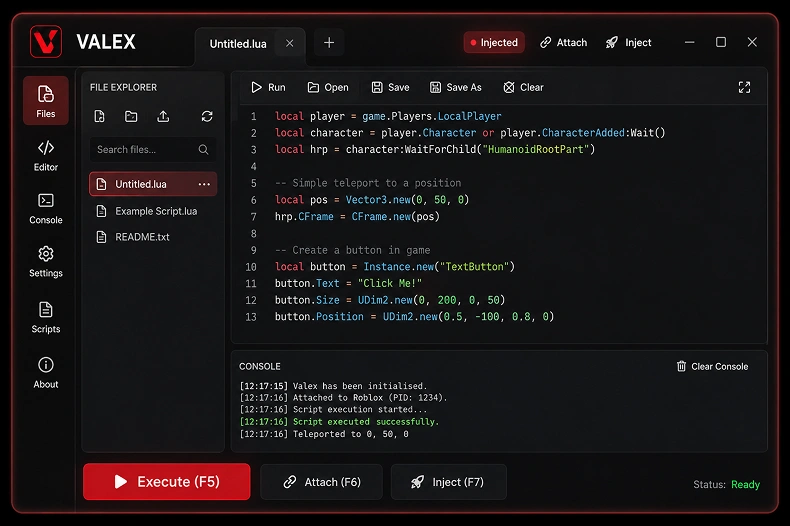
System Ready
v4.2.0 · Undetected
System Status
Main Features
Discover why the Valex executor is the premier choice for developers and enthusiasts. Engineered for precision, delivering a frictionless external workflow and a lethal edge in any environment.
Cross-Platform
Unparalleled compatibility. Seamlessly switch between the robust PC executor and our optimized mobile app.
External Exec
Advanced external workflow ensures maximum isolation, completely separating processes from the client.
Expansive Script Hub
Access a massive native repository. Full logic support ensures compatibility across all modern environments and engines.
-- Securing connection and fetching latest offsets...
Instant Startup
Built from the ground up for speed. Initializes instantly, providing a friction-free environment for testing and deployment.
Clean UI
Premium dark digital SaaS aesthetic. No bloat, no ads. Just you and the code.
Auto Updates
Engineered to last. We deploy updates silently in the background, ensuring 100% compatibility.
How to Download
Get started with Valex Executor in minutes. Whether you're setting up Valex Executor on desktop or running the Valex Executor app on your phone, follow the step-by-step guide below for your platform.
Download Installer
Click the Download button below to get the official .exe installer from valex.best.
Disable Antivirus
Temporarily whitelist or pause your antivirus to prevent false-positive blocks during install.
Run Setup
Launch ValexSetup.exe and follow the on-screen installation prompts.
Open Roblox
Launch Roblox and join any game. Keep the client running in the foreground.
Inject & Execute
Click Attach, paste your script, and press Execute.
Changelog
Track every update to Valex Executor. We ship frequently to keep the Valex Executor engine undetected and performant. Below is the full version history of the Valex Executor app.
Supported Scripts
The Valex Executor Script Hub supports thousands of scripts across the most popular Roblox experiences. Every script in the Valex Executor library is tested for compatibility and updated regularly.
Blox Fruits
Auto-farm, teleport, fruit sniper, mastery grinder, sea events tracker.
Pet Simulator 99
Auto-hatch, auto-collect, dupe detection, huge pet farmer, rank boost.
Murder Mystery 2
ESP, role revealer, coin grabber, aimbot, knife/gun modifier.
Brookhaven RP
Troll scripts, fly, speed, noclip, admin commands, vehicle mods.
King Legacy
Auto-farm, fruit finder, boss killer, quest completer, stat allocator.
Arsenal
Aimbot, silent aim, ESP, kill aura, anti-recoil, weapon unlocker.
Da Hood
Lock-on, silent aim, stomp aura, auto-rob, ESP, hitbox expander.
Troubleshooting
Running into issues with Valex Executor? Browse common problems below. Most Valex Executor issues resolve with a quick setting change or reinstall of the Valex Executor app.
Status
1Add the Valex folder to your antivirus exclusion / whitelist.
2Re-download from valex.best — don't use third-party mirrors.
3Temporarily disable real-time protection, install, then re-enable.
Defender: Settings → Virus & Threat Protection → Exclusions → Add folder.
1Roblox must be fully in-game (not home screen) before Attach.
2Run Valex as Administrator.
3Close other executors — only one can attach at a time.
4Restart both Roblox and Valex, then retry.
1Install .NET 8 Desktop Runtime and VC++ Redistributable.
2Delete %appdata%/Valex/cache and relaunch.
3Portable builds: re-extract to a fresh folder.
1Update Valex — usually a bypass issue patched recently.
2Wait 5–10s after joining before Attach.
3Don't stack scripts modifying the same systems.
If Bypass status shows "Updating" — wait for the patch to deploy.
1Check Console for errors — script may be outdated.
2Verify compatibility in the Script Hub.
3Test with print("hello") to confirm injection.
1Verify Android 8.0+ in Settings → About Phone.
2Re-download — file may be corrupted.
3Enable "Install unknown apps" for your browser.
1Re-sign via AltStore or Sideloadly.
2TrollStore users: reinstall directly.
Enable AltStore auto-refresh to prevent future revocations.
1Check Script Hub status in the sidebar.
2Disable VPN/proxy blocking api.valex.best.
3Settings → Advanced → Clear Script Cache.
1Update to v4.2.0+ — memory leak fix was included.
2Close the Console tab when not debugging — log rendering is CPU-heavy.
3Restart Valex after 2+ hours of continuous use.
1Check firewall — Valex needs access to api.valex.best.
2Delete %appdata%/Valex/updater.lock and restart.
3Still stuck? Download the latest version manually from valex.best.
Corporate networks often block unknown domains — try mobile hotspot.
Frequently Asked Questions
Everything you need to know about Valex Executor. Can't find your answer? Check the Troubleshooting section or reach out to the Valex Executor community.
Yes. Valex uses an advanced external execution workflow that completely separates its processes from the game client. This provides maximum safety and reliability. The codebase is free from malicious components and rigorously tested before every release.
Download the client for your platform, launch Roblox and join a game, then open Valex. Click "Attach" to connect to the running process. Once attached, paste or select your script from the hub and click "Execute". The entire flow takes under 30 seconds.
Click any of the red "Download" buttons on this official website (valex.best). The site auto-detects your platform and offers the correct installer. Always download from the official source to receive the genuine, unmodified build.
Absolutely. Valex Executor ships dedicated builds for Windows, macOS, Android, and iOS. Each version is optimized natively for its platform — not a web wrapper — ensuring full performance and feature parity across devices.
Valex Executor is a modern script execution tool for Roblox. It lets you inject and run custom Lua scripts, modifications, and gameplay enhancements through an external, undetected workflow with a clean premium interface.
Yes, the core version is completely free. All essential execution features — injection, Script Hub access, auto-updates — are included at no cost. No paywalls, no trials, no hidden fees.
We ship patches within hours of any Roblox client update or detection change. Feature releases drop every 2–4 weeks. All updates are delivered silently through the built-in auto-updater — no manual re-downloads needed.
Yes. Valex supports full Lua execution — paste any custom script into the editor or load .lua files from disk. The built-in editor includes syntax highlighting, IntelliSense, and multi-tab support for managing multiple scripts at once.